01
Register
One device: badge it, claim it, and record what and where it is.
Badge the smoke alarm and the extinguisher, record what they are, and get told before a date passes instead of after.
 ResQ-R
The first perspective: one household, a handful of devices, and the dates nobody remembers until it is too late.
 ResQ-R
ResQ-R
ResQ-R
ResQ-R
ResQ-R
 ResQ-R
 ResQ-R
ResQ-R
ResQ-R
ResQ-R
ResQ-R
Four perspectives, and this is the smallest one: a single household. You have, probably, a smoke alarm or several, possibly an extinguisher, a first-aid kit, maybe a carbon monoxide detector, a car seat, an emergency ladder in a cupboard. Every one of those has a date on it somewhere, and essentially nobody knows what any of those dates are. Smoke alarms have a service life of about ten years from manufacture, not from when you fitted them, and they do not tell you when they reach it - they just become less good at detecting smoke while continuing to chirp reassuringly when you press the button. Extinguishers lose pressure. First-aid kits expire. This lesson is what a household actually does with ResQ-R, which is less than you might think and more useful than it sounds.
Three things. First, you will be able to register a device: put a badge on it, claim the badge, and record what the thing is, where it is and when it expires. Second, you will be able to say what happens with the expiry date afterwards - which is one notice when the date approaches and one if it passes, and not a weekly nag. Third, you will be able to decide which details of yours are public and which are not, one row at a time, and explain why that decision exists at all.
The word for what you make is a registration, and the useful thing about it is what it is not. It is not the public page. The creator of the badge wrote the public page - what a smoke alarm is, how to test it, what the chirp means - and that is the same for every smoke alarm in the country. Your registration is a separate record attached to the one physical object in your hallway: this alarm, fitted in this spot, made by this manufacturer, with this serial number, replaced on this date, expiring on that one. Two different things about the same badge, kept apart on purpose, because they have different owners and completely different privacy requirements. Your serial number is not public safety information and there is no version of this where it accidentally becomes so.
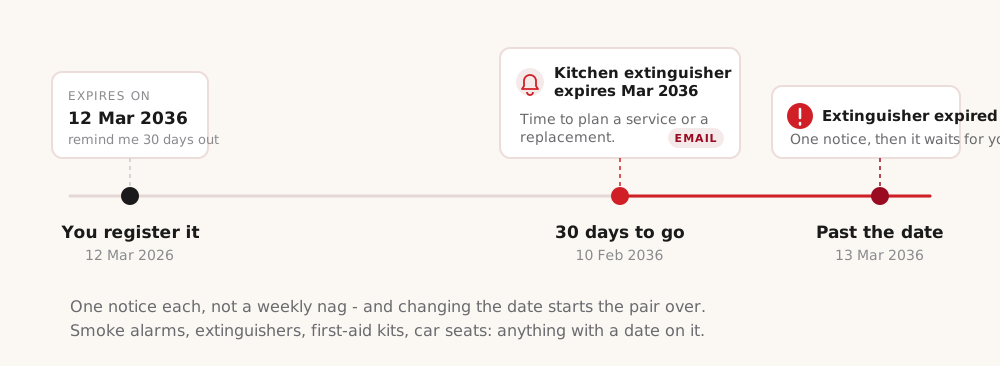
Now the part that earns its keep. When you register something you can give it an expiry date, and say how far ahead you want warning - thirty days by default. Then two things happen and only two. When the date enters your warning window, you get one notice: in the app, and as an email unless you have turned emails off. If the date passes, you get one more. That is the whole behaviour. It is deliberately not a weekly reminder, because a system that nags is a system people mute, and a muted safety reminder is worse than none at all - it feels like coverage without being coverage. Change the expiry date, because you replaced the thing or had it serviced, and the pair resets and waits for the new date. The check runs daily, so the notice arrives on the right day rather than whenever somebody happens to log in.
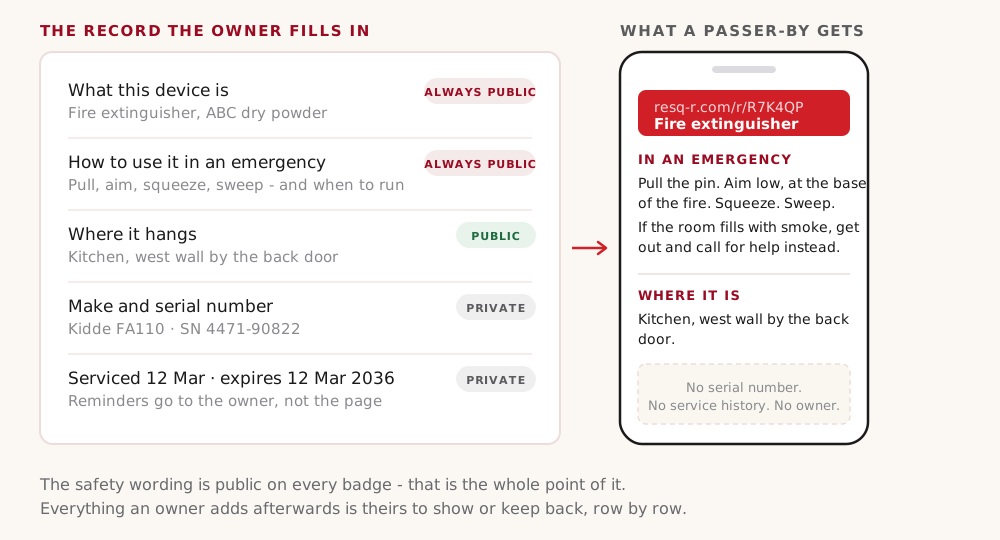
The privacy model, which is simpler than most. Each detail you add is marked public or private, and you set that per row rather than per device. The safety wording is always public - what the thing is and how to use it in an emergency - because that is the entire point of putting a badge on it, and there is no switch to turn that off. Everything you add afterwards is your call. Where it hangs is a reasonable thing to make public: it helps a visitor find the nearest extinguisher. Your make and serial number is a reasonable thing to keep private, and most people do. Service and expiry dates are usually private for a household and usually public for a business, which is a good illustration of why this is a choice and not a policy. Everything private stays in your account, and the public page simply does not have those fields on it - it is not hidden text a determined person can dig out.
Registering your first thing, start to finish, in about four minutes. Stick the badge somewhere it will be seen and will survive - on the extinguisher body rather than the hose, on the alarm's edge rather than over the sensor, and not over anything the manufacturer printed. Scan it with your camera, or type the short code into resq-r.com if you prefer. Claim it: enter the PIN printed on the label, which is what proves the badge is physically in your hand rather than photographed from across a car park. Then fill in what you know, and only what you know - a blank field is fine and a wrong one is not. Where it is. Make and model if the plate is legible. The expiry date, which is the field that does the work. And take a photograph of the expiry label while you are standing there, because in two years you will not want to get the ladder out to check whether you typed it correctly.
Four household traps. First, treating the ten-year life of a smoke alarm as ten years from when you fitted it. It runs from manufacture, the date is stamped on the back, and an alarm bought cheap on clearance may already be three years into it. Second, recording the purchase date because it is the one you know and calling it the service date. A wrong date is worse than a blank one: it produces a reminder that arrives at the wrong time and quietly teaches you to ignore reminders. Third, keeping the record and the object apart - the manual in a drawer, the receipt in an email, the serial in a spreadsheet - because in an actual emergency none of those are reachable and after a fire some of them no longer exist. The badge is on the object, which is the only place it is guaranteed to be. Fourth, publishing more than you meant to. Ask of any row: would I put this on a postcard on my front door? Where the extinguisher is, yes. The serial number of everything I own, no.
Three things from the household perspective. Your registration is your own record of one real object, kept separate from the public safety page and owned by you. An expiry date buys you two notices and no nagging, which is the difference between a system you keep and a system you mute. And the public-private decision is per row, with the safety wording always public and everything you add afterwards yours to choose. Next lesson is the same badge in a completely different situation: not your hallway, but a street, where the reader is a stranger and quite possibly nine years old.