01
Define
What a QR code holds, and why it is a pointer rather than a document.
The black-and-white square, what is actually inside it, and what happens on the phone between pointing and reading.
 ResQ-R
Before anything about safety badges: the square itself, what it holds, and why it can be half destroyed and still work.
 ResQ-R
ResQ-R
ResQ-R
ResQ-R
ResQ-R
 ResQ-R
ResQ-R
ResQ-R
 ResQ-R
ResQ-R
ResQ-R
Welcome to Meet ResQ-R. Six short lessons on a simple idea: that a piece of safety equipment should be able to explain itself to whoever is standing in front of it. We will get to the dog, the badges and the four different reasons people use them. This first lesson is about the plumbing underneath all of it, which is the QR code. Most people have scanned hundreds of them and could not say what one is. That is fine for a restaurant menu and not fine here, because the whole argument for putting a code on a fire extinguisher rests on properties of the code that are not obvious: that it survives damage, that it needs no app, that it costs nothing to print, and that what it points at can be changed after the thing is on the wall. Twelve minutes and you will know what is in the square.
Three things by the end. First, you will be able to say what a QR code physically is: not a picture, not a barcode with more stripes, but a grid of light and dark cells encoding a short piece of text, usually a web address. Second, you will be able to point at the parts of one and say what each does - the three big squares in the corners, the empty margin, the timing lines, the redundant data that lets a torn code still read. Third, you will be able to explain what actually happens in the two seconds between raising a phone and landing on a page, and why no app is involved in any modern phone made in the last decade.
A QR code is a grid of light and dark cells that encodes a short piece of text. Almost always that text is a web address. This matters more than it sounds, because it means the code is not the content. The square on the extinguisher does not contain the fire instructions. It contains the sentence resq-r.com slash r slash R7K4QP, and that is all it will ever contain. Everything a person reads afterwards lives on a server and can be rewritten this afternoon. Compare that to the label printed beside it. The label is the content, so a mistake on the label is a mistake until somebody reprints and replaces every copy. The code is a pointer, and a pointer is cheap to redirect. That single property - indirection - is why a paper sticker can carry information that stays current for twenty years.
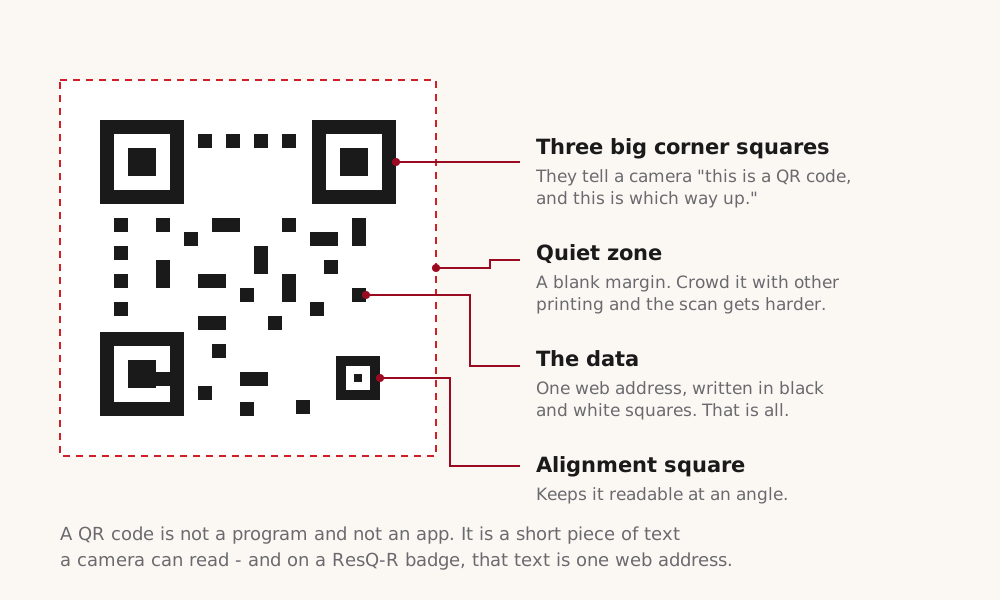
Here is one, taken apart. The three heavy squares in the corners are finder patterns. They are there so a camera can work out in a single frame that it is looking at a code at all, and at what angle - which is why you can scan one upside down, sideways, or off to one side and it still reads. The white margin around the outside is the quiet zone. It is not decoration; a code butted up against dark artwork often will not scan, and this is the single most common reason a homemade badge fails. The broken dotted lines running between the finder patterns are timing patterns: they tell the reader how wide one cell is, so it can lay a grid over the image. And most of the rest of the square, surprisingly, is not your data. It is Reed-Solomon error correction - deliberate redundancy, up to thirty percent of the code at the highest setting, which is what lets a scratched, faded, or partly covered code still read correctly. That is the property that makes this technology suitable for something bolted to a wall in a boiler room for a decade.
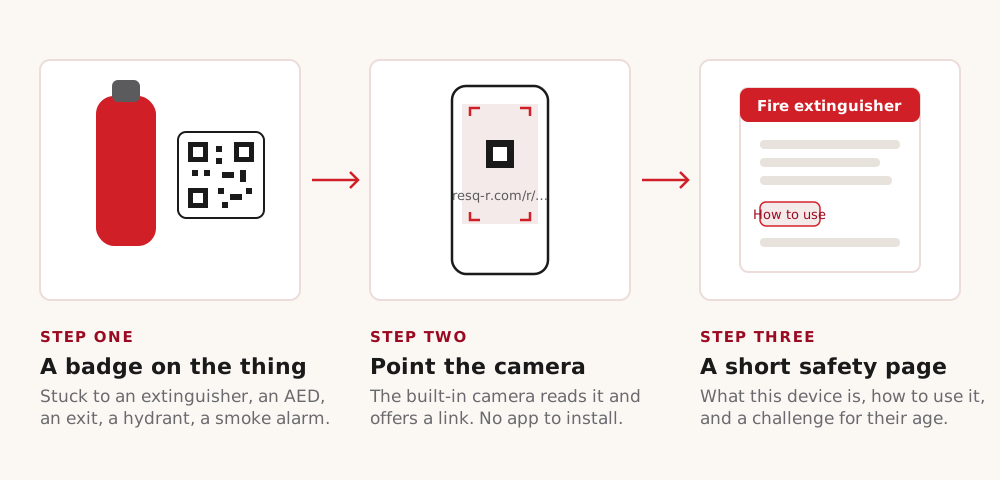
Scanning one, on the assumption that somebody in the room has never deliberately done it. Open the camera app. Not a QR app - the camera. Every iPhone since 2017 and essentially every Android phone since about the same time reads codes in the standard camera, and the app-store QR readers that people still install are, at best, unnecessary. Point the camera at the code and hold reasonably still. Fill maybe a third of the frame with it; too close and the lens cannot focus, too far and the cells blur together. Wait for the notification to appear - a yellow bar on an iPhone, a button or a chip on Android - and read the address on it before you tap. That habit is worth building. Then tap it, and the phone opens the page in its browser. Four steps, no account, no installation, and nothing typed.
So here is the whole chain, end to end. A badge is stuck on a piece of equipment - an extinguisher, a hydrant, a defibrillator cabinet. Somebody walks past, is curious or is in trouble, and points a phone at it. The camera decodes the square into a short address. The browser fetches that address. A page comes back with what this specific thing is and what to do with it. Notice what is absent from that chain. There is no app to install and no account to create, which matters enormously because the moment you require either, you have lost the passer-by, the visitor, the substitute teacher and the twelve-year-old. There is also no scanning of the person: reading a page is just reading a page. The badge is a public sign that happens to be updatable, and it is open to everyone, permanently, by design.
Four things that go wrong, three of them fixable by the person who printed the badge. First, a code that will not scan because it has no quiet zone - somebody laid it against a dark background or cropped the margin off to make it fit. Second, a code printed too small for its distance. A rule of thumb: the code wants to be about a tenth of the distance you expect somebody to scan it from, so a sign read from three metres needs a code about thirty centimetres across, and a sticker on an extinguisher you stand next to can be two or three. Third, no signal - the code resolves to an address and the address needs the network, which is a real limitation in a basement or a lift lobby, and the reason a short code printed in plain text underneath is worth the space. Fourth, and this one is not a printing problem: a sticker placed over somebody else's sticker. Codes are trivially cheap to make, and a malicious one looks identical to a good one. The defence is the habit from the last slide - read the address before you tap - and, on the badge side, a domain a reader can recognise.
Three things to carry into the next lesson. A QR code is a pointer, not a document: it holds an address, and the thing at the other end of the address can be rewritten whenever you like. It is built to survive being damaged, which is why it is a reasonable thing to put on equipment that lives in a boiler room or a school corridor for a decade. And it needs nothing of the reader - no app, no account, no typing - which is what makes it usable by whoever happens to be standing there. Hold on to that last one especially. Everything in the next lesson is built on the assumption that the person reading is a stranger who was not expecting to.